
Local-FirstPrompt Managerfor Mac
Save prompts outside chat history as Markdown files, search them from the keyboard, and copy them into ChatGPT, Claude, Gemini, Cursor, or any editor.
Free download · macOS 10.13+ · Apple silicon and Intel
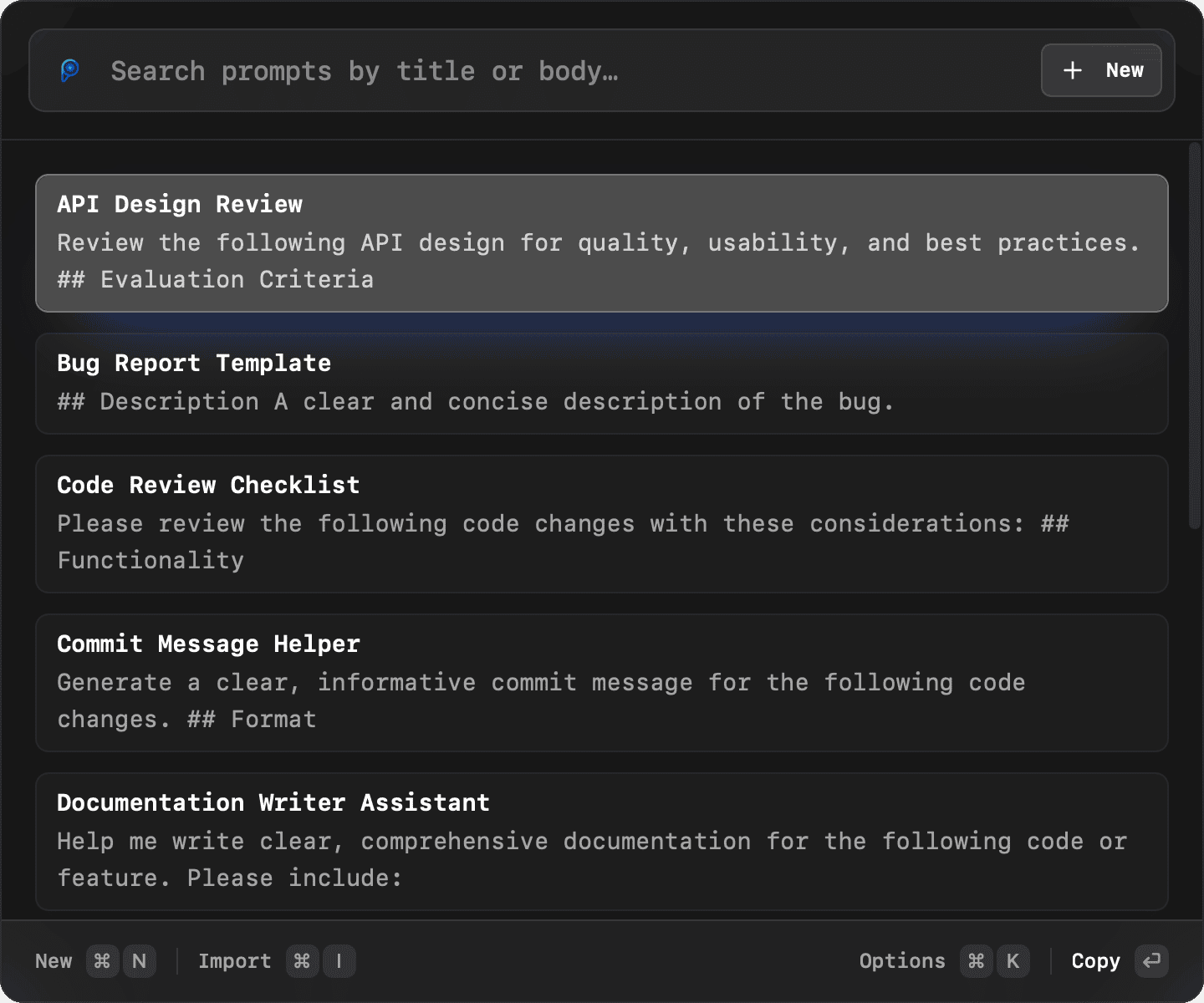
A prompt library that fits how you already work
Promptlight combines fast local search, portable Markdown storage, and optional enhancement so your best prompts stay useful instead of getting lost in chats.
Lightning-Fast Search
Fuzzy search through your prompts instantly. Find what you need in milliseconds with intelligent matching.
Enhancer Mode
Rewrite a draft after you find it, so saved prompts and rough notes become clearer and easier to reuse.
Keyboard-First Workflow
Every action in Promptlight is keyboard-first. Launch with a shortcut, browse with a shortcut, copy with a shortcut.
Local Prompt Files
Your prompt vault can stay on your Mac as files you control, instead of being stored in another hosted workspace by default.
Edit with Any App
Your prompts are plain Markdown files. Edit them in VS Code, Obsidian, or any editor, and Promptlight picks up the saved changes.
Favorite Prompts
Mark your favorite prompts to pin them for quick access. No need to search for them every time.
Real product workflow
Launch, find, and reuse a prompt without leaving your flow
Open Promptlight with a shortcut, search your local Markdown library, then copy the right prompt into any AI tool. These are real screens from the Mac app.
- Step 1⌘⌥P
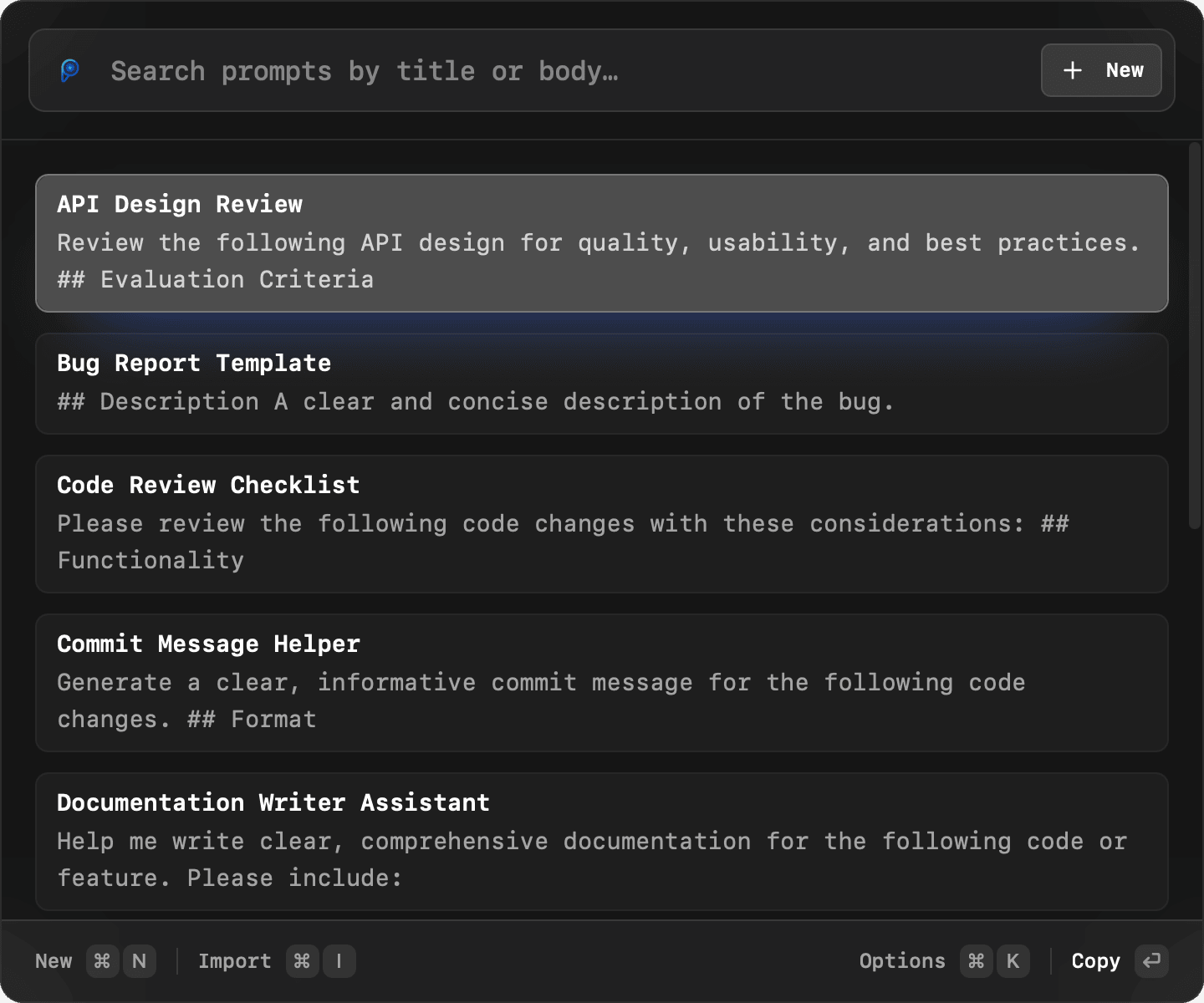
Launch with Hotkey
Press ⌘⌥P from anywhere to open Promptlight
- Step 2type
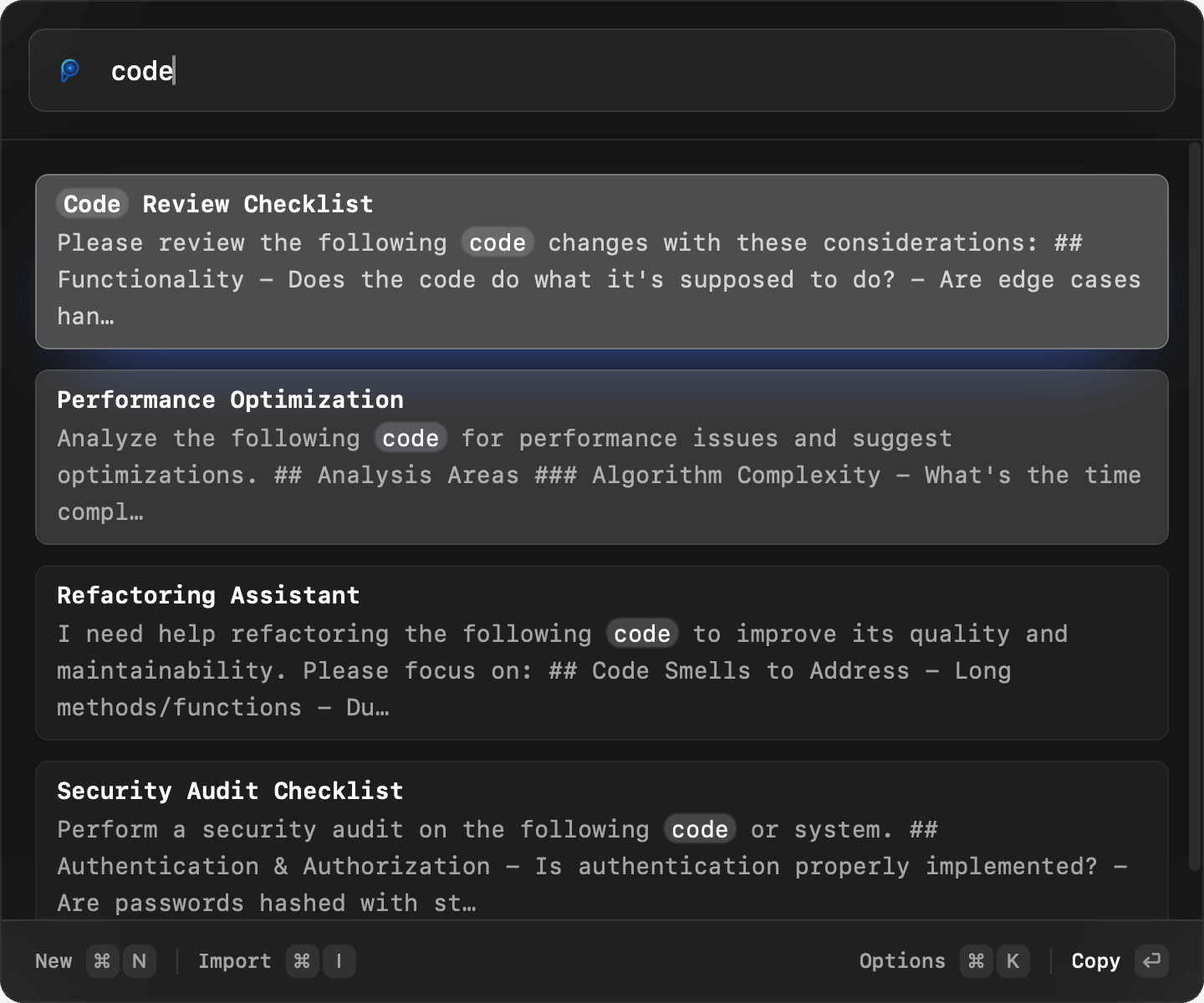
Search Your Library
Find the right prompt fast with keyboard-first search across your saved library.
- Step 3↵
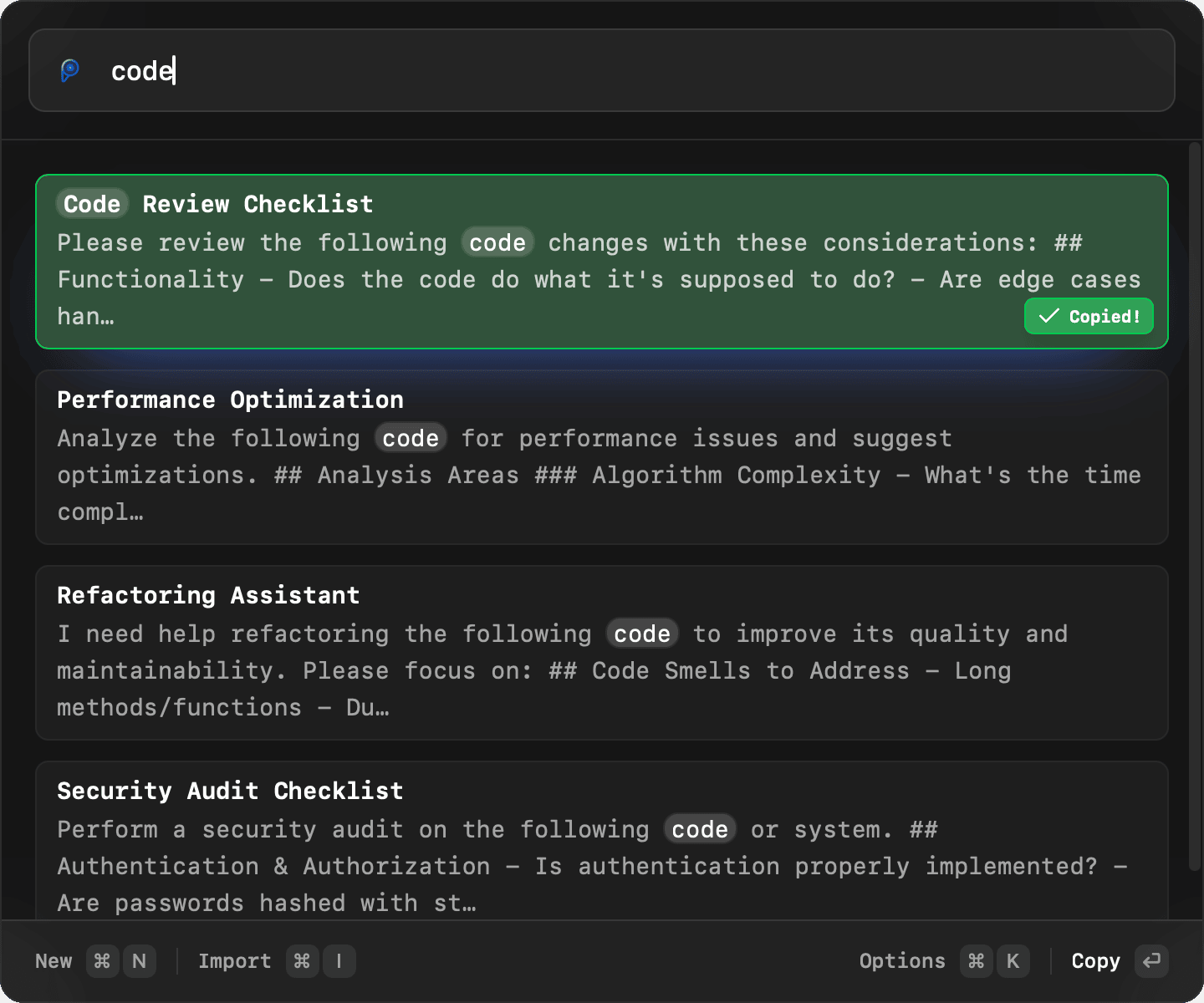
Refine or Copy
Copy a saved prompt immediately, or switch to Enhancer mode when you want a rewrite.
Use cases
Save prompts outside chat history, then find them fast
Promptlight gives reusable prompts a local home, then makes them easy to search, edit, and copy across the tools you already use.
Why Promptlight
Why people switch to Promptlight
- Works with ChatGPT, Claude, Gemini, Cursor, and any app that accepts paste.
- Local-first storage keeps your prompt library on your Mac, not trapped in another SaaS.
- Markdown files make prompts easy to edit in VS Code, Obsidian, iCloud Drive, Dropbox, or git.
- Keyboard-first search feels like Spotlight, so prompt retrieval becomes part of your normal flow.
Developers
Keep code review, debugging, refactor, and onboarding prompts one shortcut away.
Founders & operators
Reuse strategy, hiring, customer research, and planning prompts across your week.
Marketers & writers
Save campaign briefs, copy prompts, brand voice prompts, and editing workflows.
Researchers & power users
Build a personal prompt library you can search, version, and refine over time.
Build a prompt workflow that stays yours
See how to store prompts as local files, find them quickly, and reuse them without depending on chat history.
ChatGPT workflow
ChatGPT Prompt Manager
Move reusable ChatGPT prompts out of chat history and into a searchable local vault.
Local-first workflow
Local-First Prompt Manager
See why local storage, Markdown files, and fast retrieval are the core Promptlight workflow.
Markdown workflow
Markdown Prompt Library
Learn how portable Markdown files turn a prompt vault into something you can actually keep and edit.
Search workflow
Prompt Search for Mac
Understand why search is the workflow that makes a prompt manager useful every day.
Keyboard workflow
Mac Prompt Launcher
Launch prompt search and copy workflows from a keyboard-first Mac utility.
Explore workflow guides that make prompt reuse practical
These resources explain how to organize, review, and reuse prompts in a local-first system.
Article
Build a Local-First Prompt Vault That Stays Useful
Learn how naming, structure, and retrieval keep a prompt vault useful instead of turning into storage clutter.
Guide
How To Organize Your Prompt Vault Without Overcomplicating It
See a simple system for naming, grouping, tagging, and retrieving prompts as the library grows.
Guide
Run a Prompt Review Workflow Before Sharing Prompts Internally
Use a lightweight review loop so prompts are clearer, safer to reuse, and easier to hand off.
Product page
Promptlight Features
See how local search, Markdown files, favorites, and Enhancer mode fit into one prompt workflow.
Resource hub
Prompt Guides
Browse practical guides for organizing, reviewing, and improving reusable prompts.
Resource hub
Promptlight Blog
Read strategy and workflow articles about local-first prompt systems, review, and reuse.
Prompt library
Try a useful prompt in your own workflow
Browse reusable prompts, copy one as it is, or save it to your vault and adapt it for the way you work.
Browse all promptsPopular prompt
Acceptance Criteria Writer
Write concise, observable acceptance criteria from a product requirement while exposing missing decisions and edge cases.
Popular prompt
Acceptance Test Designer
Turn a feature requirement into observable acceptance tests that cover success, failure, permissions, and boundary conditions.
Popular prompt
Accessibility Code Reviewer
Review an interface change against observable accessibility needs, keyboard use, semantics, focus, and content clarity.
Popular prompt
Ad Creative Brief Writer
Write an ad brief grounded in an audience need, verified benefit, approved proof, channel constraints, and honest disclosure.
Popular prompt
Alt Text and Caption Writer
Write useful alt text and an optional caption from an image's content, function, context, and surrounding text.
Popular prompt
API Contract Reviewer
Review an API contract for consistency, missing behavior, compatibility risks, and testable next steps before implementation.
Simple Pro pricing
Choose monthly or yearly billing. Upgrade when you need more AI prompt enhancements.
Pro Monthly
Flexible monthly access
- 300 AI prompt enhancements per month
- Lightning-fast prompt search
- Unlimited prompts in vault
- All product updates included
- Email support
14-day money-back guarantee. Cancel anytime.
Pro Yearly
RecommendedBest value for regular use
- 300 AI prompt enhancements per month
- 2 months free compared with monthly
- Lightning-fast prompt search
- Unlimited prompts in vault
- All product updates included
- Email support
14-day money-back guarantee. Cancel anytime.
Frequently Asked Questions
Everything you need to know about Promptlight. Can't find what you're looking for? Feel free to reach out to our support team.
Promptlight is a local-first prompt manager for Mac. It helps you save prompts as Markdown, search them like Spotlight, and quickly copy or reuse them across AI tools.
Enhancer mode rewrites your draft prompt into a clearer, more detailed, or more creative version. It runs in the cloud, so it needs an internet connection.
Free users get 15 enhancements per month. Pro subscribers get 300 enhancements per month. Limits reset monthly.
Just point Promptlight to a folder containing your markdown files—they'll appear instantly. You can also create new prompts directly in the app. Any changes you make in external editors sync automatically.
Search, browse, and copy work with the prompt files in your local vault. If you use Enhancer mode, Promptlight sends the draft you submit and the selected mode to its AI provider for processing. Promptlight does not store that prompt content after processing.
Promptlight requires macOS 10.13 High Sierra or later. Downloads are available for both Apple Silicon and Intel Macs.
Yes! While the default shortcut is ⌘⌥P, you can customize it to any keyboard combination you prefer in the app's settings. Choose what works best for your workflow.
Yes! Promptlight copies prompts to your clipboard, so it works with any AI tool or application. Simply launch Promptlight, select your prompt, and paste it anywhere you need it - ChatGPT, Claude, browser-based tools, or any other application.
Pro includes 300 AI prompt enhancements per month, unlimited prompts in your local vault, fast prompt search, product updates, and email support.
Your subscription includes a 14-day money-back guarantee. If you're not satisfied, contact us within 14 days of purchase for a full refund, no questions asked.
Search and copy work fully offline. You only need internet for Enhancer mode, downloading updates, or verifying your license.
Yes! Since your prompts are just markdown files in a folder, you can put that folder in iCloud Drive, Dropbox, Google Drive, or any synced location. You can also use git to version control your prompts and sync them across machines.
Yes. Promptlight works with your local prompt vault on your Macs. Put the vault in iCloud Drive, Dropbox, Google Drive, or git if you want prompts available across devices.
Get Started Today
Download Promptlight for free, or send yourself the link if you're browsing on mobile and want to install it later on your Mac.
Version 1.2.5 • 17.6 MB • macOS 10.13 (High Sierra) or later